Difference
Short version
extendsmeans:
The new class is a child. It gets benefits coming with inheritance. It has all properties, methods as its parent. It can override some of these and implement new, but the parent stuff is already included.
extends to profit from inheritanceimplementsmeans:
The new class can be treated as the same "shape", while it is not a child. It could be passed to any method where the
Person is required, regardless of having different parent than Personimplements will be more for polymorphism
Overriding a method
Classes provide
"super" keyword for that.super.method(...)to call a parent method.super(...)to call a parent constructor (inside our constructor only).
class Rabbit extends Animal {
  stop() {
    // ...this will be used for rabbit.stop()
  }
}
Arrow functions have no
super
As was mentioned in the chapter Arrow functions revisited, arrow functions do not have
super.
If accessed, it’s taken from the outer function. For instance:
class Rabbit extends Animal {
  stop() {
    setTimeout(() => super.stop(), 1000); // call parent stop after 1sec
  }
}
The
super in the arrow function is the same as in stop(), so it works as intended. If we specified a “regular” function here, there would be an error:// Unexpected super
setTimeout(function() { super.stop() }, 1000);
Access modifiers
There are 3 access modifiers:
- public
- This is the default and means its visible everywhere.
- private
- Only member functions of the class it’s declared in can see this.
- protected
- Only the class it’s declared in and any class that inherits from that class can see this.
Function Expression VS. Function Statement
Function Statement/Declarations
function bar() {
return 3;
}
function bar() {return 3;}Function Expression?
A JavaScript function can also be defined using an expression.
A function expression can be stored in a variable:
Benefits of Function Expressions
There are several different ways that function expressions become more useful than function declarations.
- As closures
- As arguments to other functions
- As Immediately Invoked Function Expressions (IIFE)
Function Expression VS. Function Statement
Example: Function Expression
alert(foo()); // ERROR! foo wasn't loaded yet
var foo = function() { return 5; }
Example: Function Declaration
alert(foo()); // Alerts 5. Declarations are loaded before any code can run.
function foo() { return 5; }- Function declarations load before any code is executed while Function expressions load only when the interpreter reaches that line of code.
- Similar to the
varstatement, function declarations are hoisted to the top of other code. Function expressions aren’t hoisted, which allows them to retain a copy of the local variables from the scope where they were defined.
Abstraction vs Encapsulation
Abstraction is hiding the information or providing only necessary details to the client.
e.g Car Brakes- You just know that pressing the pedals will stop the vehicle but you don't need to know how it works internally.
Advantage of Abstraction Tomorrow if brake implementation changes from drum brake to disk brake, as a client, you don't need to change(i.e your code will not change)
How to abstract: - By using Access Specifiers
.Net has five access Specifiers
Public -- Accessible outside the class through object reference.
Private -- Accessible inside the class only through member functions.
Protected -- Just like private but Accessible in derived classes also through member
functions.
Internal -- Visible inside the assembly. Accessible through objects.
Protected Internal -- Visible inside the assembly through objects and in derived classes outside the assembly through member functions.
Encapsulation is hiding implementation from end user. Example:
In the above example, str1 String instance object hide implementation details of Length from client.
How to abstract: - By using Access Specifiers
.Net has five access Specifiers
Public -- Accessible outside the class through object reference.
Private -- Accessible inside the class only through member functions.
Protected -- Just like private but Accessible in derived classes also through member
functions.
Internal -- Visible inside the assembly. Accessible through objects.
Protected Internal -- Visible inside the assembly through objects and in derived classes outside the assembly through member functions.
Encapsulation is hiding implementation from end user. Example:
String str1="Hello";
Console.Write(str1.Length);
In the above example, str1 String instance object hide implementation details of Length from client.
Encapsulation is binding the data and behaviors together in a single unit. Also it is a language mechanism for restricting access to some components(this can be achieved by access modifiers like private,protected etc.)
For e.g. Class has attributes(i.e data) and behaviors (i.e methods that operate on that data)
Encapsulation: Wrapping up data member and method together into a single unit (i.e. Class) is called Encapsulation.
Encapsulation is like enclosing in a capsule. That is enclosing the related operations and data related to an object into that object.
Encapsulation is like your bag in which you can keep your pen, book etc. It means this is the property of encapsulating members and functions.
class Bag{
    book;
    pen;
    ReadBook();
}
Encapsulation means hiding the internal details of an object, i.e. how an object does something.

Const vs Var vs Let
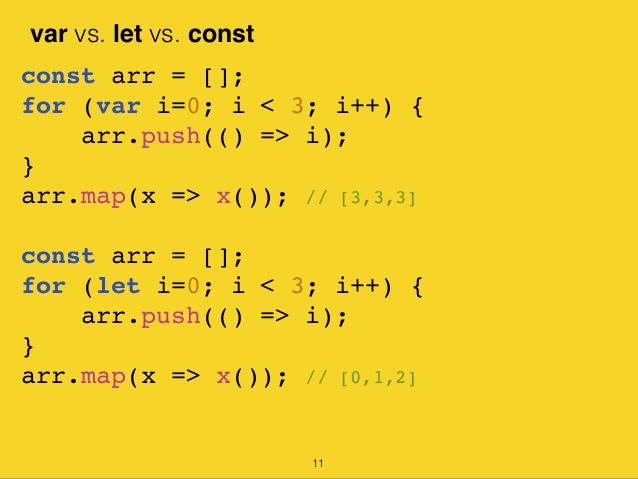
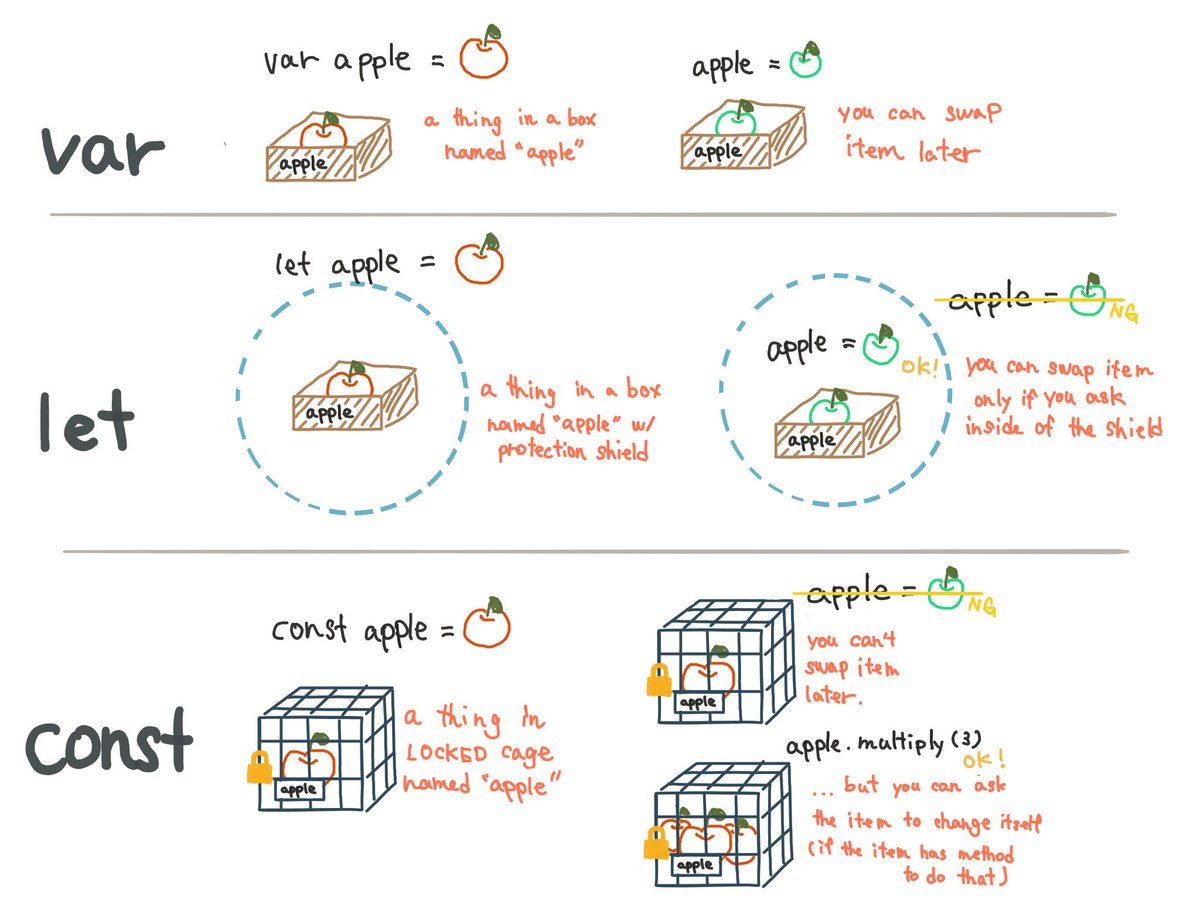

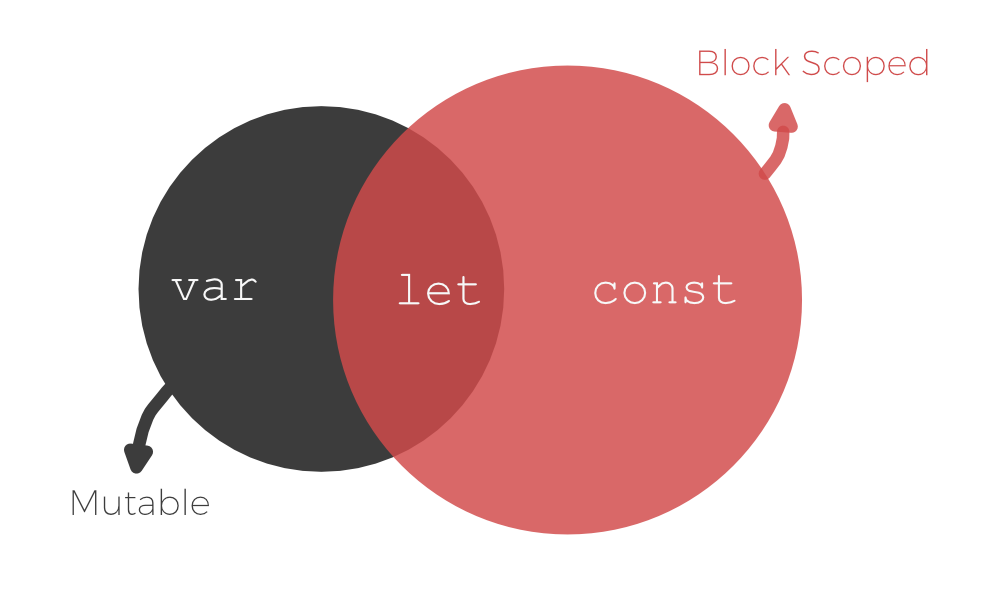
Class vs Interface
According to Angular 2
styleguide it's recommended to use
Class over Interface for the typing.
The main difference is that class will
persist when compiled while Interface are
purely removed since they do not serve any usage.
Simply Class is to create objects and Interface
assists you what these objects should contain.
Class is like a Object
factory /blueprint/template
using which we can create objects. Interface is like a contract/Structure/Data model on which a Class has to agree on to
implement that Interface or define what this blueprint should contain.
A simple class:
class Car {
engine: string; // 'var' is not used;
constructor(engine: string) { // This is how we create constructor
this.engine = engine;
}
display(): void { // 'function' keyword is not used here.
console.log(`Engine is ${this.engine}`); // just a log.
}
}
var objCar = new Car('V8'); // creates new onject
objCar.display(); // output: Engine is V8
console.log(objCar.engine); // output: V8 (accessing member here)
A simple
Interface:
interface IPerson { // This is how we create an interface.
firstName: string, // use commas to separate.
lastName: string, // In classes we use semi-colon to separate.
displayDetails: (number) => string
}
// We are going to store 'interface object' in a variable.
// i.e. we are implementing interface with variable(not class!!)
var customer: IPerson = {
firstName: 'jose jithin', // 'implements' variables
lastName: 'stanly',
// Now method implementation.
// Note: the syntax of 'displayDetails' maybe a bit confusing (given below)
// as two colons are used.
// It specifies a return type(string) here for this method.
displayDetails: (rank): string => { return `This person has rank ${rank}. ` }
// It can be rewritten as following too.
displayDetails: (rank) => { return `This person has rank ${rank}. ` };
// i.e. return type need not be specified, just like a normal method definition syntax.
}
console.log(customer.firstName); // output: jose jithin
console.log(customer.lastName); // output: stanly
console.log(customer.displayDetails(1)); // output: This person has rank
CSS Processor SASS vs LESS

Tight vs Low coupling

Difference between tight coupling and loose coupling
- Tight coupling is not good at the test-ability. But loose coupling improves the test ability.
- Tight coupling does not provide the concept of interface. But loose coupling helps us follow the GOF principle of program to interfaces, not implementations.
- In Tight coupling, it is not easy to swap the codes between two classes. But it’s much easier to swap other pieces of code/modules/objects/components in loose coupling.
- Tight coupling does not have the changing capability. But loose coupling is highly changeable.
as we know loose coupling can achieve through interface implementation and inheritance make tight couple.
Let's say 2 classes A and B need to comunicate with each other.
A <--knows--> B
Methods in A would have some parameter B and methods in B have a parameter of type A. E.g. like
 class A {
     public void talkTo(B b) {}
 }
Now that's a tight coupling between A and B because every change you do to these classes can make changes in the other class necessary.
If you do it loosely coupled they both expose themselves through some interface. ("interface" can mean abstract class too - that's a choice the respecive side.)
   IA  <-- A
     ^     |
      \   /
        X           < loose coupling between the A side and the B side
      /   \
     v     |
   IB  <-- B     < pretty tight coupling betwen IB and B
and communication between them goes via those interfaces
   class A implements IA {
        public void talkTo(IB b);
   }
   class B implements IB {
        public void talkTo(IA a);
   }
The dependency between A and IA (that's what you seem to look at) is not what tight vs loose coupling is primarily about. There is some similarity but loose coupling doesn't mean that you should implement an interface vs. extend an abstract class. It's usually better to implement just an interface though.
If you can replace an "IS A" relation with a "HAS A" relation you do essentially the same. You decouple yourself (e.g. you are A) from a concrete implementation and only need to depend on the encapsulated other side (e.g. from the B side). Inheritance is indeed a very powerful feature but it is often misused.
Tight vs Low coupling
An IS-A relationship is inheritances. The classes which inherit are known as sub classes or child classes. On the other hand, HAS - A relationship is composition
In OOP, IS - A relationship is completely inheritance. This means, that the child class is a type of parent class. For example, an apple is a fruit. So you will extend fruit to get apple.
class Apple extends Fruit{
.
.
}
On the other hand, composition means creating instances which have references to other objects. For example, a room has a table. So you will create a class room and then in that class create an instance of type table.
class Room{

:
Table table = new Table ();
:
:
}
A HAS-A relationship is dynamic (run time ) binding while inheritance is a static (compile time ) binding. If you just want to reuse the code and you know that the two are not of same kind use composition. For example, you cannot an oven from a kitchen. A kitchen HAS-A oven. When you feel there is a natural relationship like Apple is a Fruit use inheritance.
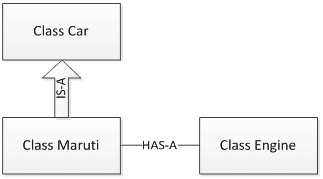
Foo is-a Bar:--inheritance is a static binding [extends]
public class Foo extends Bar{}
Foo has-a Bar-----composition dynamic (run time ) binding [implements]
public class Foo {
    private Bar bar;
}
extends: A derived class can extend a base class. You may redefine the behaviour of an established relation. Derived class "is a" base class type
implements: You are implementing a contract. The class implementing the interface "has a" capability.
Comparing Composition and Inheritance
- It is easier to change the class implementing composition than inheritance. The change of a superclass impacts the inheritance hierarchy to subclasses.
- You can't add to a subclass a method with the same signature but a different return type as a method inherited from a superclass. Composition, on the other hand, allows you to change the interface of a front-end class without affecting back-end classes.
- Composition is dynamic binding (run-time binding) while Inheritance is static binding (compile time binding)
- It is easier to add new subclasses (inheritance) than it is to add new front-end classes (composition) because inheritance comes with polymorphism. If you have a bit of code that relies only on a superclass interface, that code can work with a new subclass without change. This is not true of composition unless you use composition with interfaces. Used together, composition and interfaces make a very powerful design tool.
- With both composition and inheritance, changing the implementation (not the interface) of any class is easy. The ripple effect of implementation changes remains inside the same class.
- Don't use inheritance just to get code reuse If all you really want is to reuse code and there is no is-a relationship in sight, use composition.
- Don't use inheritance just to get at polymorphism If all you really want is a polymorphism, but there is no natural is-a relationship, use composition with interfaces.
Implement vs Extend
extends is for extending a class.implements is for implementing an interface
The difference between an interface and a regular class is that in an interface you can not implement any of the declared methods. Only the class that "implements" the interface can implement the methods. The C++ equivalent of an interface would be an abstract class (not EXACTLY the same but pretty much).
Also java doesn't support multiple inheritance for classes. This is solved by using multiple interfaces.
 public interface ExampleInterface {
    public void doAction();
    public String doThis(int number);
 }

 public class sub implements ExampleInterface {
     public void doAction() {
       //specify what must happen
     }

     public String doThis(int number) {
       //specfiy what must happen
     }
 }
now extending a class
 public class SuperClass {
    public int getNb() {
         //specify what must happen
        return 1;
     }

     public int getNb2() {
         //specify what must happen
        return 2;
     }
 }

 public class SubClass extends SuperClass {
      //you can override the implementation
      @Override
      public int getNb2() {
        return 3;
     }
 }
in this case
  Subclass s = new SubClass();
  s.getNb(); //returns 1
  s.getNb2(); //returns 3

  SuperClass sup = new SuperClass();
  sup.getNb(); //returns 1
  sup.getNb2(); //returns 2
extends: A derived class can extend a base class. You may redefine the behaviour of an established relation. Derived class "is a" base class type
implements: You are implementing a contract. The class implementing the interface "has a" capability.
Unrelated classes can have capabilities through interface but related classes override behaviour through extension of base classes.
json vs javascript object literal
|
JSON:
|
Object literal
|
|
{ "foo": "bar" }
|
var o = { foo: "bar" };
|
First you should know what JSON is:
- It is language agnostic data-interchange format.
The syntax of JSON was inspired by the JavaScript Object Literal notation, but there are differences between them.
For example, in JSON all keys must be quoted, while in object literals this is not necessary:
// JSON:
{ "foo": "bar" }

// Object literal:
var o = { foo: "bar" };
The quotes are mandatory on JSON because in JavaScript (more exactly in ECMAScript 3rd. Edition), the usage of reserved words as property names is disallowed, for example:
var o = { if: "foo" }; // SyntaxError in ES3
While, using a string literal as a property name (quoting the property name) gives no problems:
var o = { "if": "foo" };
So for "compatibility" (and easy eval'ing maybe?) the quotes are mandatory.
The data types in JSON are also restricted to the following values:
stringnumberobjectarray- A literal as:
truefalsenull
The grammar of
Strings changes. They have to be delimited by double quotes, while in JavaScript, you can use single or double quotes interchangeably.// Invalid JSON:
{ "foo": 'bar' }
The accepted JSON grammar of
Numbers also changes, in JavaScript you can use Hexadecimal Literals, for example 0xFF, or (the infamous) Octal Literals e.g. 010. In JSON you can use only Decimal Literals.// Invalid JSON:
{ "foo": 0xFF }
mmmmmmmmmmmmmmm

Comments
Post a Comment